
Download FM Kits Hub
Keep every Football Manager kit organised and up to date without touching a single file. FM Kits Hub checks the repository, downloads what is new, builds the config.xml the game needs and can even grab a whole country in one go.
- Version
- 1.2.1
- Platform
- Windows 10 / 11 (64-bit)
- Price
- Free
- Account
- Not needed
SHA-256 8fcf45aa5cdc25a29cb5204b66509ba54c5dd56309b53dcba1da42c8b7393aed
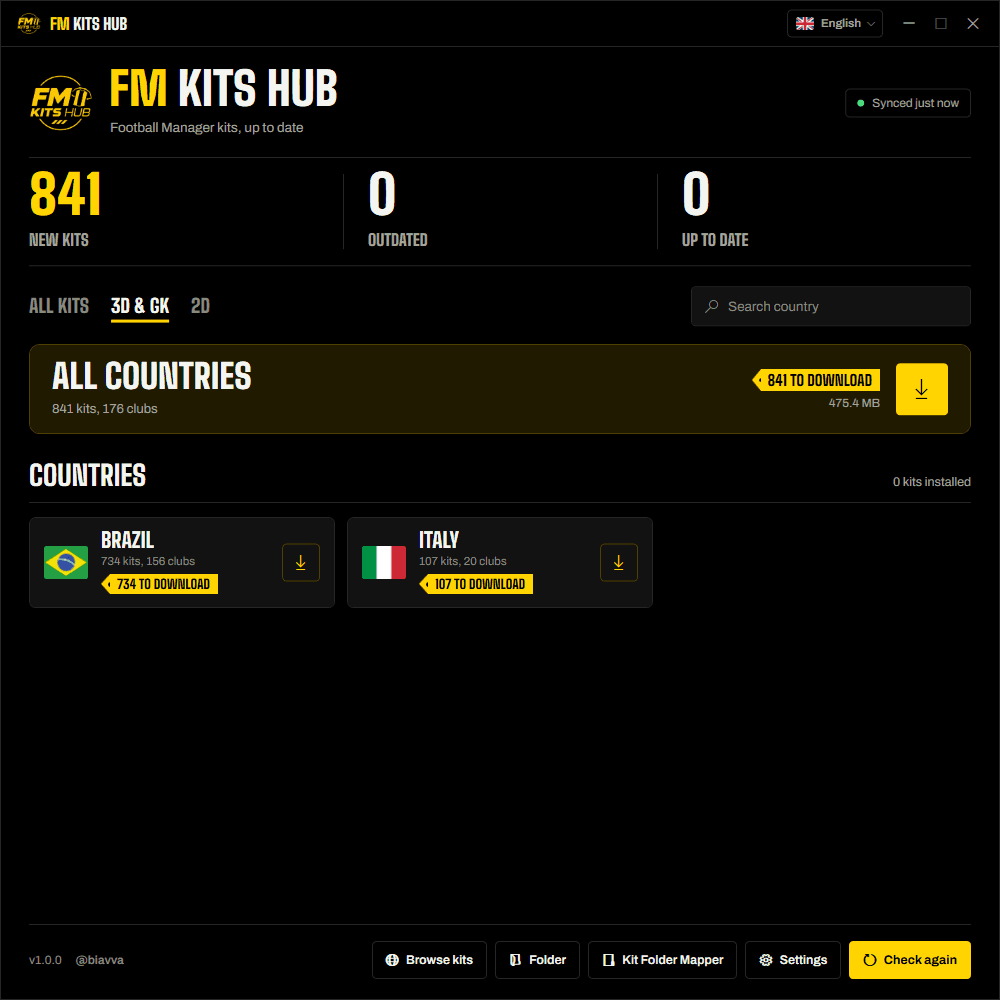
Everything it does, at a glance
Each feature is explained in detail below.
Automatic sync
Compares your folder with the repository and shows what is new or outdated.
One-click updates
Downloads only what is missing, verifying every file.
Country packs
Every kit of one country at once, with its own config.xml.
config.xml for you
Writes the file Football Manager needs, no manual editing.
Automatic backups
Replaced kits are kept in Kits\Leftovers\Replaced.
Signed & verified
Signed catalogue, SHA-256 on every file, safe folders only.
Automatic sync with the repository
As soon as you open the app it reads the FM Kits Hub catalogue and compares it with the kits in your folder, so you always know where you stand.
- Three counters on the main screen: New kits (not installed yet, or installed but the file is gone), Outdated (a newer version exists) and Up to date.
- Two tabs to separate kit types: 3D & GK and 2D, each with its own counters and list.
- Every pending kit shows the club crest, club name, country, kit type (Home, Away, Third, GK...) and a NEW or OUTDATED badge. When a club has no crest yet, its initials are shown instead.
- A status pill tells you when the last check happened (“Synced just now”, “Synced 5m ago”...) and updates by itself. Click Check again whenever you want a fresh look.
- If the internet is down or the catalogue cannot be verified, the app says so clearly and installs nothing.
One-click updates, done safely
Press Download updates and the app fetches only the kits you are missing or that changed, for the tab you are on.
- A progress bar and the name of the file being downloaded (“Downloading 1099_home_3d.png (3/12)…”).
- Cancel at any moment: what was already installed stays, and nothing is left half-written.
- Each file goes to a temporary file first, its SHA-256 is checked against the catalogue and only then it is moved into place. A corrupted or tampered file is discarded.
- A connection that stops sending data is dropped after 30 seconds, so the app never hangs forever.
- If a file fails for a temporary reason (network hiccup, busy server), the app retries it up to 2 more times before giving up on that file.
- Your install history is saved after every kit, so closing the app halfway does not lose progress.
- When it finishes you get a summary: how many were installed, how many failed and why, with a log file for the details.
- The summary has an Open folder button that takes you straight to your Kits folder in Windows Explorer. The same shortcut is always available as the Folder button at the bottom of the main window.
Country packs
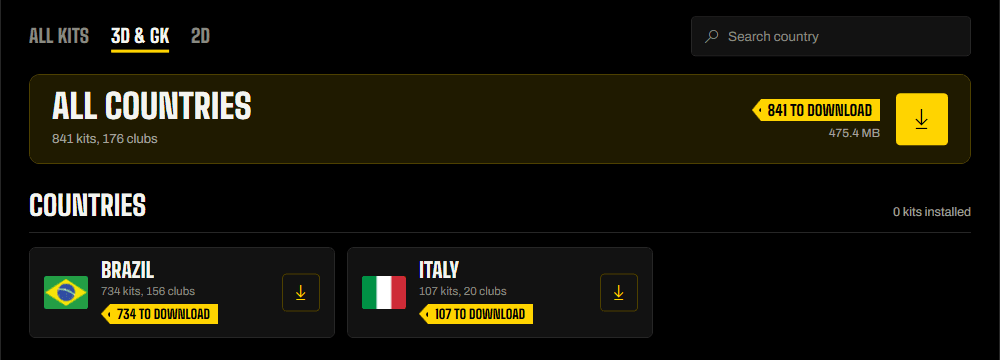
Want every kit of one country without going club by club? The Packs section builds it for you.
- A list of every country that has kits, with its flag (the same as on this site), name and number of kits.
- A search box that ignores capitals and accents, so “brasil” finds Brazil.
- Click a country and the app asks where to save it, then shows a confirmation with the country, the number of kits and clubs and the final folder.
- It downloads everything with the same checks as a normal update, into a folder called FM Kits Hub - Country with 2D, 3D and GK subfolders.
- A config.xml is created in each subfolder, covering only that country's kits, ready to drop into the game's graphics folder.
- Packs are independent: they do not change your install history or the main list of updates.
- Prefer the browser? Country pages on this site also have a .zip button, but the app handles large countries much better.
The config.xml, written for you
Football Manager needs a config.xml linking each image to the right place. The app creates and refreshes it automatically after every install.
- One file per club folder (3D, GK and 2D, by country and club), rebuilt from the images that are really there.
- Each kit is mapped to the path the game expects (…/kit_textures/home, away, third, gk_home… for 3D and goalkeeper, …/kits/… for 2D), sorted by club.
- Files outside the naming pattern are ignored, so odd files in the folder cannot break the configuration.
- A config.xml that was not made by our apps is renamed to config.old.xml and kept in Kits\Leftovers\Old XML before it is replaced.
Automatic backups: Leftovers
Updating should never cost you a kit you liked. Before replacing a file, the app keeps the previous one.
- The old version is moved to Kits\Leftovers\Replaced, in the same country and club folder. Nothing is ever deleted.
- If a backup with that name already exists, the new one gets the date and time in its name, so no version is ever overwritten.
- If the file is identical to the new one, nothing is copied.
- There is no undo button on purpose: to go back, just copy the old file back manually.
Simple settings
The only thing to set up is where your kits live.
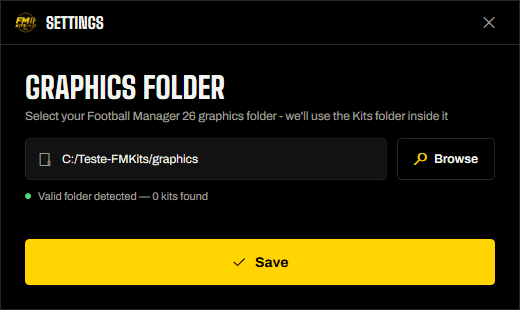
- Pick your Football Manager graphics folder once. The app creates the Kits folder inside it, with 3D, GK and 2D split by country and club.
- It validates the folder and tells you how many kits it already finds there.
- You can change the folder at any time; the app checks everything again when you save.
Security and privacy
An app that writes into your game folder has to earn your trust. This one was built with that in mind.
- Signed catalogue: the list of kits carries a digital signature (ECDSA P-256). If it cannot be verified, the app installs nothing.
- File verification: every download is checked with SHA-256 before it is saved.
- Safe destinations only: it can write just to the 2D, 3D and GK folders inside your Kits folder, and only .png files from https addresses.
- No account, no ads, no tracking: the app sends no personal data and does not collect usage statistics. Like any download, our servers see the request itself.
- Data stays local: settings, install history and a plain-text log live in %AppData%\FM Kits Hub, and you can delete them whenever you want.
Small details that help
The rest of what makes it pleasant to use every day.
- Update notice: when a newer version of the app is available, a banner opens this download page.
- Browse kits opens the catalogue on this site, and the title and @biavva link open the site and X.
- Matching visual style throughout: dialogs, confirmations and messages follow the app's look instead of plain Windows boxes.
- Friendly error messages and a log file with the technical details if anything goes wrong.
- Unexpected errors are caught and logged, so the app tells you what happened instead of closing.
- Completely free, and made by the community for the community.
Requirements
- Windows 10 or 11, 64-bit
- Football Manager 26
- Internet connection
- About 70 MB of disk space for the app (plus your kits)
- No installer, no .NET to install, no account
Up and running in 3 steps
- 1DownloadSave the file anywhere you like.
- 2Open and pick your graphics folderThe first launch asks for it once.
- 3Press Download updatesOr open Packs to grab a whole country.
Questions
Windows says “Windows protected your PC”. Is it safe?
Do I need to install anything else?
Which game and Windows versions are supported?
What exactly does it change on my computer?
Can I undo an update?
How do I verify the file?
certutil -hashfile FMKitsHub.exe SHA256. The result must match the SHA-256 published at the top of this page.How do I update the app itself?
How do I uninstall it?
Ready to play with the latest kits?
Free, safe and always up to date. Or browse the catalogue first.
Unofficial fan project, not affiliated with Sports Interactive or SEGA.