
Kits without leaving the game
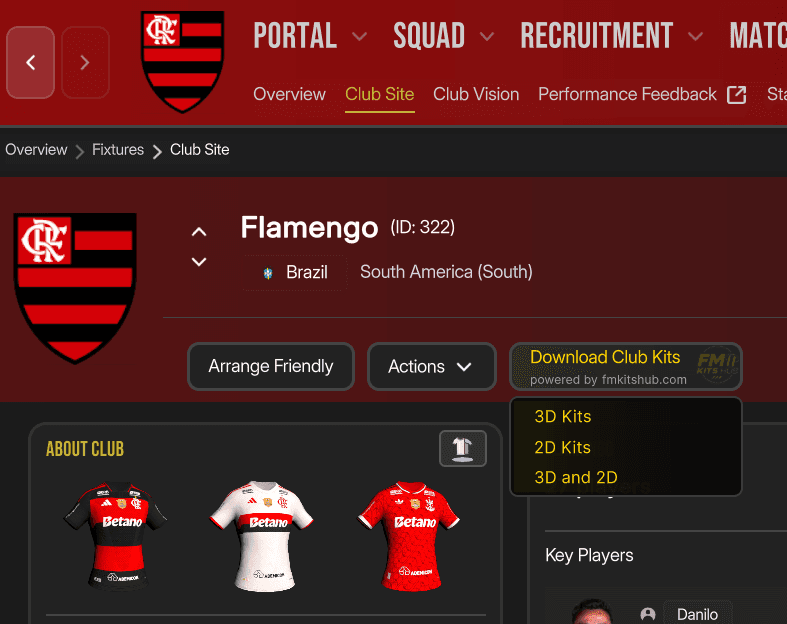
A plugin for Football Manager 26 that puts FM Kits Hub buttons right on the club, league and country screens. One click downloads the kits, organises the Kits folder and makes the game reload its graphics, so the new kits appear straight away.
- Version
- 1.0.1
- Game
- Football Manager 26
- Price
- Free
- Size
- 74 KB
Install in 3 steps
- 1Install BepInEx 6The plugin runs on BepInEx 6 for Unity IL2CPP (x64). Unzip it into the Football Manager 26 folder and open the game once, so BepInEx finishes its setup.
- 2Copy the pluginUnzip the plugin and copy the FMKitsHub folder (with its two DLLs) to
BepInEx\pluginsinside the game folder. - 3Open a clubStart FM and open any club, league or country. The FM Kits Hub button is in the header.
Requirements
- Football Manager 26 on Windows (Steam, Epic or Xbox PC)
- BepInEx 6 for Unity IL2CPP (x64)
- The game option that shows IDs turned on (the plugin reads the "(ID: n)" next to the club name)
- Internet connection to download the kits
Questions
Do I still need the FM Kits Hub app?
No, the plugin works on its own. The FM Kits Hub app is still the best way to keep every kit up to date at once, and both share the same folders and history, so nothing is downloaded twice.
Where are the kits saved?
In the folder you chose in the FM Kits Hub app or, without the app, in
Documents\Sports Interactive\Football Manager 26\graphics\Kits.The button does not appear. What now?
Check that the FMKitsHub folder is inside
BepInEx\plugins and that the game shows club IDs. Everything the plugin does is logged in BepInEx\LogOutput.log, in the lines that start with [FM Kits Hub].Does it work with FM ActionLink - Kits 3D?
Yes. If that plugin is installed, the new kits show up in 3D straight away.
Is it safe? Can I get banned?
Football Manager has no online bans for plugins, and this one only adds buttons and writes image files to your Kits folder. Plugins are not supported by Sports Interactive, so remove it before reporting a game bug to them.
How do I uninstall it?
Delete the FMKitsHub folder from
BepInEx\plugins. Your kits stay where they are.Ready to play with the right kits?
Free, and nothing is ever deleted.
Unofficial fan project, not affiliated with Sports Interactive or SEGA.