
Organize your kits by country and club
Years of kit packs end up as one big mess inside the graphics folder: the same kit three times, odd file names, no idea what is what. FM Kit Folder Mapper finds every kit, lets you settle the duplicates and puts each one in its own country and club folder, with the config.xml the game needs.
- Version
- 1.1.1
- Platform
- Windows 10 / 11 (64-bit)
- Price
- Free
- Internet
- Not needed
SHA-256 2e15a09f23116b7ec684e2746b457fccc677241f30db5b6a4534880068c9c243
What it does
Everything runs on your computer. You review before anything moves.
Finds every kit
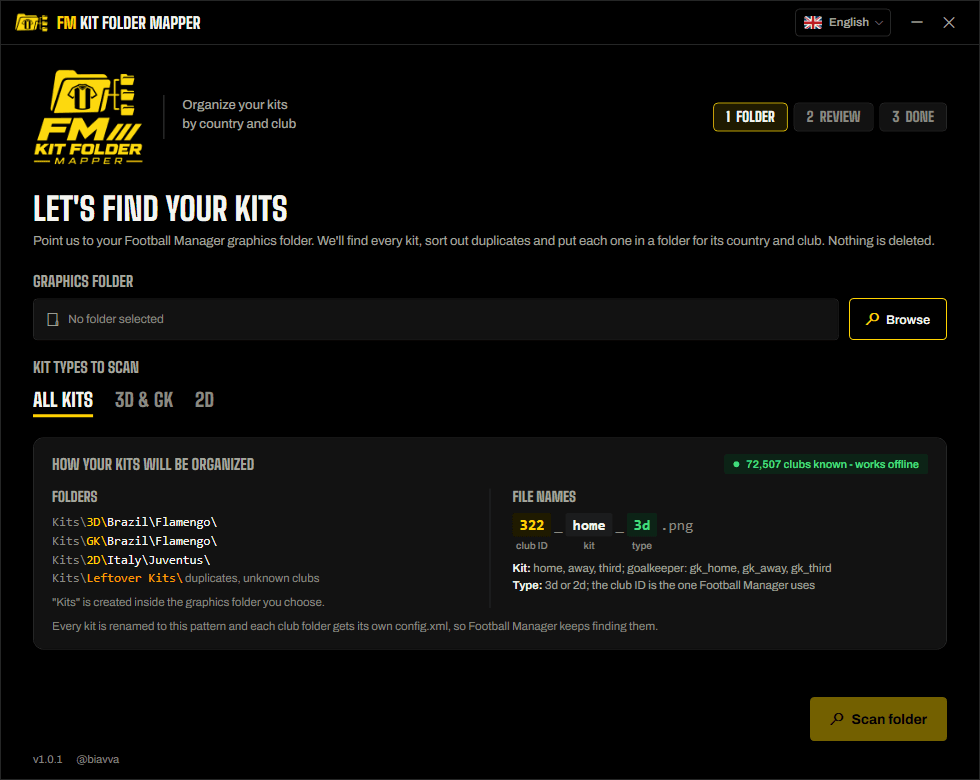
Point it at your graphics folder and it reads every config.xml inside, from any pack or creator, to work out which club and kit each image really is.
Duplicates, side by side
Same kit in several packs? It keeps the newest file by default, and the comparator shows all of them next to each other (preview, date, size, pixels) so you can pick the one you like.
Country / club folders
Everything moves into Kits\3D, GK and 2D, then Country\Club. Files are renamed to one clear pattern, like 322_home_3d.png.
A config.xml per club
Each club folder gets its own config.xml pointing to the right place, so Football Manager keeps finding every kit.
Nothing is deleted
Kits that are not chosen go to Kits\Leftovers, and so does anything in Kits that is not a kit in its place. Old config.xml files are renamed to config.old.xml. Leftovers never gets a config.xml, so nothing there can override your choices.
Works offline
The list of more than 70,000 clubs is built into the app, so it knows each club's name and country without an internet connection.
Speaks your language
English, Português (Brasil), Español, Français, Italiano and Türkçe, with the words Football Manager players actually use. Switch any time from the flag button.
Updates itself
When a new version is out, the app shows a banner and updates in a few seconds. Every update is digitally signed and verified before it is installed.
How it works
- 1Choose your graphics folderBrowse to the Football Manager graphics folder (or any folder with kit packs) and pick which kit types to scan.
- 2Review what was foundSee how many kits, duplicates and unknown clubs there are. Open the comparator on any duplicate to choose which file to keep.
- 3OrganizePress Organize my kits. Everything goes into the Kits folder by country and club, ready for the game.
The result
- Files are named club ID_kit_type.png, e.g. 322_home_3d.png or 322_gk_away_3d.png. The club ID is the one Football Manager uses.
- The Kits folder is created inside the graphics folder you choose, so the game picks everything up.
- Clubs with the same name in the same country get their ID added to the folder name, so they never mix.
Requirements
- Windows 10 or 11, 64-bit
- Football Manager kits set up with a config.xml
- About 70 MB of disk space for the app
- No installer, no .NET to install, no account, no internet
Questions
Windows says “Windows protected your PC”. Is it safe?
Does it delete any of my files?
Which kits does it find?
Do I need FM Kits Hub to use it?
Do I need to install anything else?
How do I verify the file?
certutil -hashfile FMKitFolderMapper.exe SHA256. The result must match the SHA-256 published on this page.How do I uninstall it?

Ready to tidy up your kits?
Free, offline and nothing is ever deleted.
Unofficial fan project, not affiliated with Sports Interactive or SEGA.