PES balls, on the FM26 pitch
There are hundreds of great match balls made for PES 2020 and 2021. FM Ball Converter turns each one into a ball for Football Manager 26 and saves it straight into the FM Kit Switcher balls folder. Then choose which ball each competition plays with.
Requires FM Kit Switcher
The balls only show up in the game with the FM Kit Switcher plugin installed: it is what puts the ball on the pitch. Kit Switcher already comes with 160+ balls; FM Ball Converter is for adding your own.
Get FM Kit Switcher- Version
- 1.1.0
- Platform
- Windows 10 / 11 (64-bit)
- Price
- Free
- Internet
- Not needed
SHA-256 94a9e5ab06da087d6d2f7453b0259265e92ce6cf5ba0638f9c86e02854536173
What it does
Everything runs on your computer. Your PES files are only read, never changed.
Folder or .zip
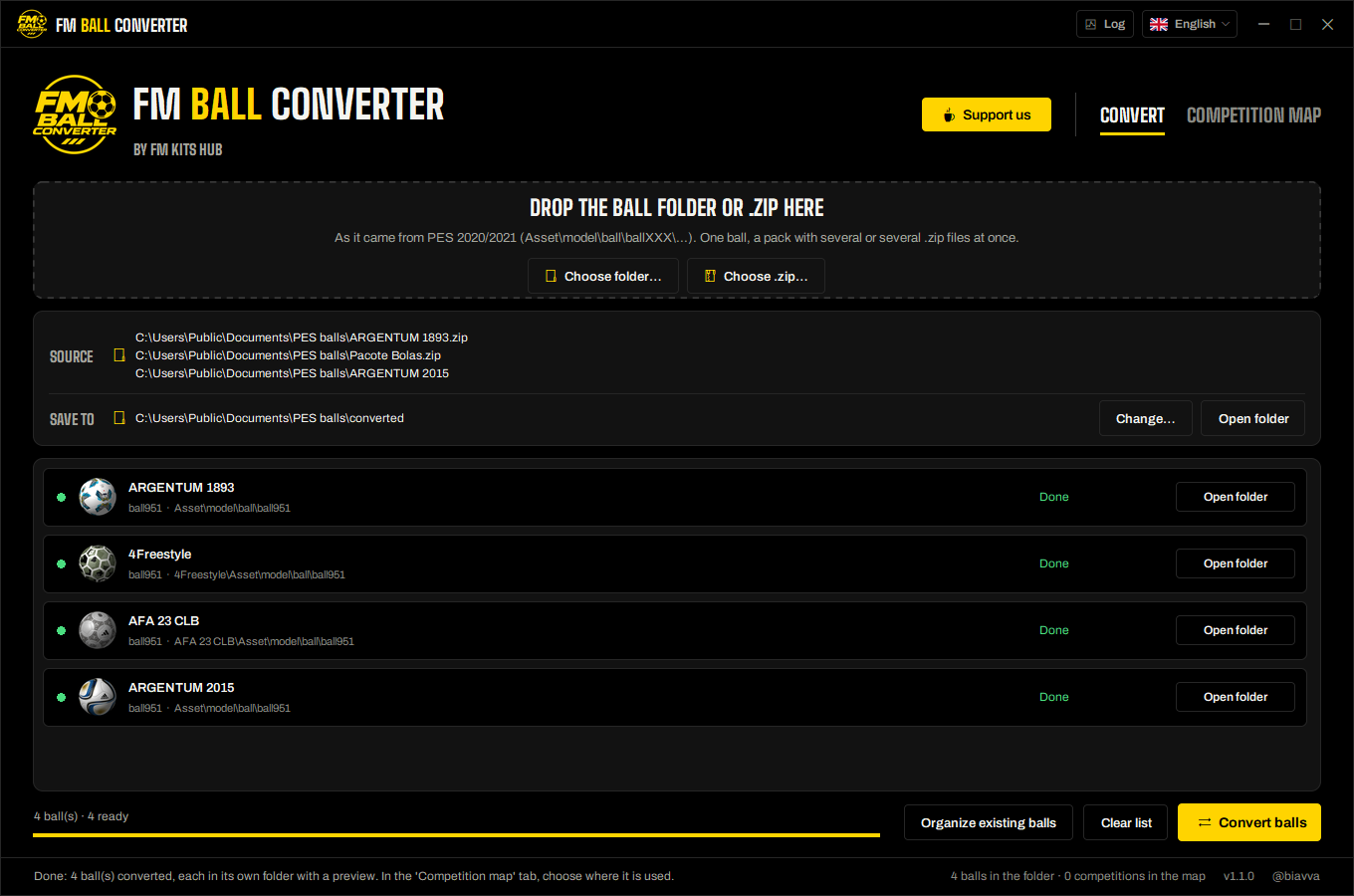
Drop the ball folder as it came from PES (Asset\model\ball\ballXXX) or the mod's .zip. One ball, a pack with many, or several .zip files at once.
Straight into the game
Finds the FM Kit Switcher balls folder of Football Manager 26 on its own and saves each ball in its own folder, ready for the next match.
See every ball
Each ball gets a preview. Click any ball to see it bigger and spin it before you convert.
Competition map
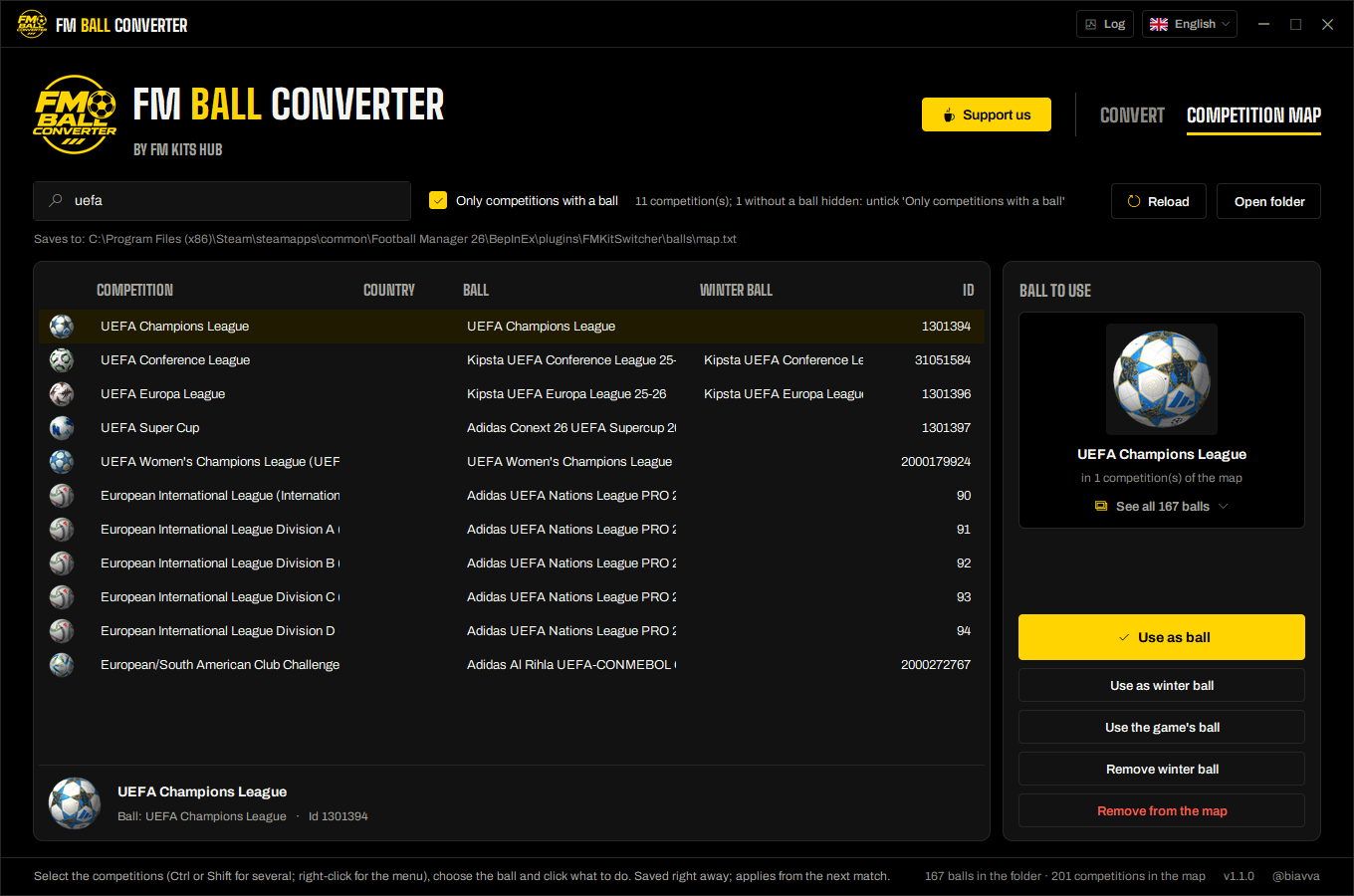
Choose the ball of each competition by its name: 7,900+ FM26 competitions, with search, winter ball and the game's own ball.
Ball gallery
All your balls with their previews in one window, with search. Click one to use it.
Tidy ball folder
Organize existing balls brings older balls to the current format: one folder per ball, preview inside and textures up to 1024 px.
Safe
Mods are read as data only: nothing from them is ever run. Converted balls are new files; your PES files are never changed.
Your language, always up to date
English, Português (Brasil), Español, Français, Deutsch and Italiano. New versions install in a few seconds, digitally signed and checked first.
The right ball for every competition
The Competition map tab edits the map Kit Switcher reads before each match.
- Search a competition by name, short name, country or id, and pick the ball from the gallery.
- Set a winter ball, or tell a competition to keep the game's own ball.
- Competitions without a ball use the ball of the country's top league.
- Saved right away: it applies from the next match. In the Kit Switcher window you can still pick any ball for a single match.
How it works
- 1Drop the ballDrag the PES ball folder or its .zip onto the window, or use Choose folder / Choose .zip.
- 2ConvertClick Convert balls. Each ball goes into the Kit Switcher balls folder, in its own folder, with a preview.
- 3Choose where it playsIn the Competition map tab, pick the competitions and click Use as ball. Done: it is in the next match.
The result
- One folder per ball in Kit Switcher's balls folder, with the .fmball file (model, textures and preview) and a small preview.png.
- The map.txt in the same folder says which ball each competition uses.
- Kit Switcher picks the new balls up at the next match: no need to restart the game.
Requirements
- FM Kit Switcher installed in Football Manager 26 (required: it puts the ball in the game)
- Windows 10 or 11, 64-bit
- PES 2020 or 2021 balls (the mod's ball folder or its .zip)
- About 30 MB for the app. No installer, no account, no internet
Questions
Do I need FM Kit Switcher?
Kit Switcher already has balls. Why this app?
Windows says “Windows protected your PC”. Is it safe?
Which PES balls does it support?
Where are the balls saved?
BepInEx\plugins\FMKitSwitcher\balls inside the game folder. The app finds it on its own in a Steam install; otherwise, choose the folder.Does it change my PES files?
How do I verify the file?
certutil -hashfile FMBallConverter.exe SHA256. The result must match the SHA-256 published on this page.How do I uninstall it?
Ready to bring your PES balls to FM26?
Free, offline, and it works together with FM Kit Switcher.
Unofficial fan project, not affiliated with Sports Interactive, SEGA or Konami.