
PES kits, ready for FM26
There are thousands of great kits made for PES 2021. Kit Converter All re-maps each one to the Football Manager 26 3D kit template in one click: shirt, shorts and socks in the right place, the right collar and the FM club ID in the file name. One kit or a whole league at once.
- Version
- 1.0.2
- Platform
- Windows 10 / 11 (64-bit)
- Price
- Free
- Internet
- Not needed
SHA-256 42b36009aa21b1b5725a88ddddfa5c0ad745c093d82b2b446655cc7c92213e35
What it does
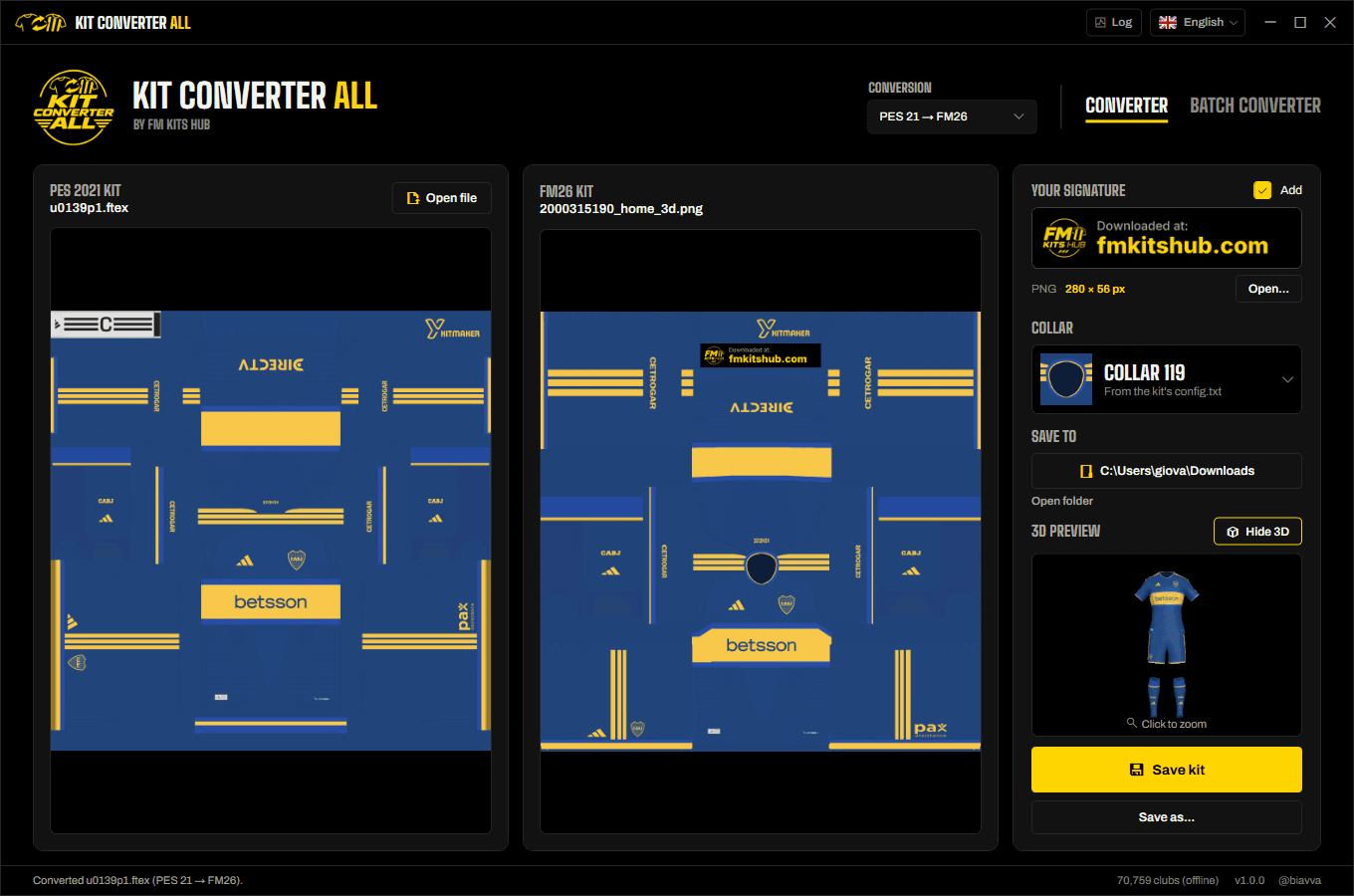
Everything runs on your computer. You see the converted kit before anything is saved.
One-click conversion
Drop a .ftex from the kit folder (p1, g1...) or a PES texture saved as .png. The FM26 version appears side by side with the original.
3D preview
See the converted kit on the FM26 player model before you open the game. Drag to rotate, scroll to zoom.
Whole leagues at once
Drop a country, league or club folder, or your whole kits folder, and convert every kit in one go.
FM club found for you
Each kit is matched to its FM club from an offline list of 70,000+ clubs and saved as id_type_3d.png. Orange dots mark the few worth a second look.
133 collars
The collar is read from the kit's PES config.txt, polo collars included. No config? Pick it from a grid that previews every collar on your kit.
Your signature
Add your own signature strip (PNG, 280 × 56 px) under the kit maker's, or keep the FM Kits Hub one. The original credits stay on the kit.
Safe saving
You choose the folder, whether to overwrite, and you are warned before two kits would end up with the same file name. Your PES files are never changed.
Your language, always up to date
English, Português (Brasil), Español, Français, Italiano and Türkçe. New versions install in a few seconds, digitally signed and checked first.
How it works
- 1Drop a kit or a folderConverter tab for a single kit, Batch Converter tab for a club, league or country folder.
- 2Check club and collarBoth are usually right already. Change the FM club or the collar with one click when needed.
- 3SaveClick Save kit (or Convert kits). The files go into your folder, ready for FM26.
The result
- One PNG per kit, in the FM26 3D kit layout, named with the FM club ID and the kit type.
- Home, away, third and goalkeeper kits (p1, p2, p3, g1...) each get their own type in the name.
- Ready for a kits folder with a config.xml. Need one? The FM XML Configurator writes it in one click.
Requirements
- Windows 10 or 11, 64-bit
- PES 2021 kits (.ftex from the kit folders, or .png textures)
- About 80 MB of disk space for the app
- No installer, no .NET to install, no account, no internet
Questions
Windows says “Windows protected your PC”. Is it safe?
Which PES kits does it support?
What if the FM club is wrong?
Does it change or delete my PES kits?
Do I need FM Kits Hub to use it?
How do I verify the file?
certutil -hashfile KitConverterAll.exe SHA256. The result must match the SHA-256 published on this page.How do I uninstall it?
Ready to bring your PES kits to FM26?
Free, offline and your original kits are never touched.
Unofficial fan project, not affiliated with Sports Interactive, SEGA or Konami.