
The right config.xml, every time
Football Manager only shows a graphic when the config.xml in its folder points to it. FM XML Configurator reads the folder, checks every file name against the game's rules, tells you what is wrong and how to fix it, and writes a clean config.xml in one click. Kits, faces, logos, flags and more.
- Version
- 2.1.1
- Platform
- Windows 10 / 11 (64-bit)
- Price
- Free
- Internet
- Not needed
SHA-256 f3174325144672eedb05b3278dec421907979d6eca6dc2236ae6707844520303
What it does
Everything runs on your computer. You see the result before anything is saved.
Every graphics type
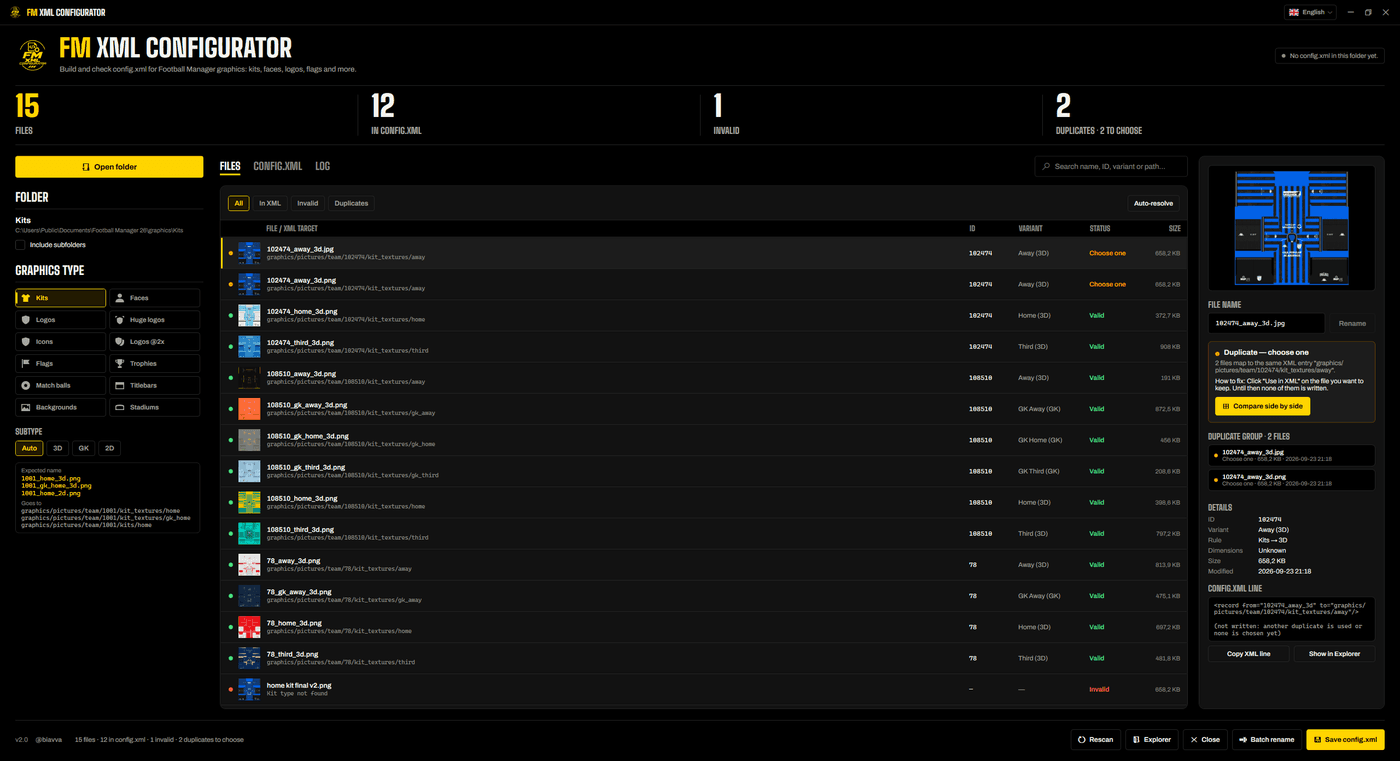
Kits, faces, logos (normal, huge, icons and @2x), flags, trophies, match balls, titlebars, backgrounds and stadiums, each with the rule Football Manager expects.
Kits on Auto
One folder can mix 3D, GK and 2D kits: each file follows its own rule from its name, like 1001_home_3d.png or 1001_gk_away_3d.png.
Valid or not, and why
Every file is marked Valid or Invalid, with the reason and how to fix it. The panel shows the exact line that goes into the config.xml.
Duplicates, side by side
Two files for the same entry? Nothing is written until you choose: compare them side by side, or let Auto-resolve keep the largest (or newest) one.
Batch rename
Rename a whole folder to the FM Kits Hub pattern, find and replace, add a prefix or suffix, or use a regex. You see a preview first and can undo it.
Built-in XML editor
Edit the config.xml as code or as a list of records, with find and replace, formatting and syntax checks. Regenerate brings it back in line with the folder.
Safe saving
A config.xml made by someone else is renamed to config.old.xml and kept before it is replaced, and every save is atomic, so a crash never leaves a half-written file.
Your language, always up to date
English, Português (Brasil), Español, Français, Italiano and Türkçe. New versions install in a few seconds, digitally signed and checked first.
How it works
- 1Open a folderPick a graphics folder (or drag it onto the window). Tick Include subfolders to read the folders inside it too.
- 2Check the listThe app suggests the graphics type from the folder. Every file shows as valid, invalid or duplicate, with the fix next to it.
- 3Save config.xmlPress Save config.xml (Ctrl+S). The file is written in the folder, ready for the game.
The result
- One record per file: from is the file name without the extension, to is where Football Manager uses it.
- With subfolders, from keeps the path from the config.xml folder, like 3D/1001_home_3d.
- Invalid files and unresolved duplicates are left out, so a wrong entry never reaches the game.
Requirements
- Windows 10 or 11, 64-bit
- Football Manager graphics (png, jpg, webp, bmp, tga or dds)
- About 70 MB of disk space for the app
- No installer, no .NET to install, no account, no internet
Questions
Windows says “Windows protected your PC”. Is it safe?
Will it overwrite my current config.xml?
Does it rename or delete my files?
How is it different from FM Kit Folder Mapper?
Do I need FM Kits Hub to use it?
How do I verify the file?
certutil -hashfile FMXmlConfigurator.exe SHA256. The result must match the SHA-256 published on this page.How do I uninstall it?
Ready to fix your config.xml?
Free, offline and nothing is ever deleted.
Unofficial fan project, not affiliated with Sports Interactive or SEGA.